PixieLearn
Built at Meta Global AI Developer Hackathon · Oct 26, 2026 · Remote
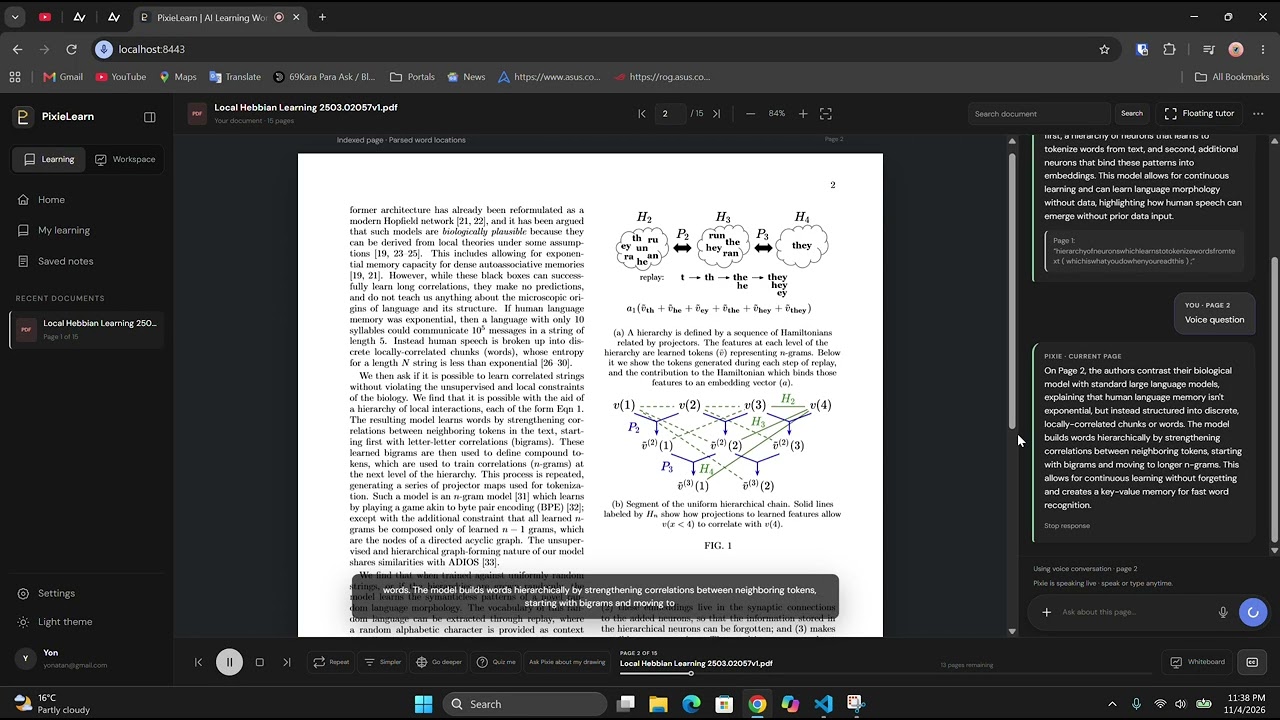
PixieLearn is an interactive, multimodal AI learning workspace and real-time voice-and-vision tutor (Pixie) powered by Meta Model API (muse-spark-1.3) and Meta Voice (muse-voice-transcribe-1.0) that transforms static academic papers, textbooks, and technical PDFs into a live, hands-on classroom experience. Instead of reading passively or copy-pasting paragraphs into a separate chat window, learners study alongside an AI teacher that reads the page with them, listens and responds in real time, highlights exact passages on the PDF, draws structured diagrams on an interactive whiteboard, inspects the learner's own sketches, and quizzes them mid-lesson. Studying dense research papers or STEM textbooks alone is often overwhelming: learners get stuck on equations, lose track of how concepts connect across pages, and have no way to get immediate visual feedback on their own mental models. PixieLearn solves this by pairing an indexed, word-level PDF study stage with Pixie, an always-live multimodal AI teacher driven by muse-spark-1.3 and muse-voice-transcribe-1.0: 1. Always-Live Voice & Text Conversation with Synchronized Captions: Learners can speak naturally with their microphone unmuted, transcribed in real time with Meta Voice (muse-voice-transcribe-1.0), or type at any time for instant, low-latency spoken explanations paired with word-synchronized live captions. 2. Full Workspace Awareness & Autonomous Tool Calling via Meta Model API (muse-spark-1.3): Pixie continuously tracks the live state of the workspace, including the active PDF page, selected passages, whether the interactive whiteboard or quiz modal is open, and what figures are on the board, and controls the UI directly via tool calls: - Live PDF Highlighting & Verbatim Citations: Automatically highlights exact verbatim quotes and headings on the PDF page (propose_pdf_highlight, record_citation) and automatically closes overlapping panels so the learner immediately sees the cited passage in context. - Interactive AI Whiteboard with Auto-Clean: Clears outdated board clutter and draws structured Mermaid flowcharts, architectures, and concept maps (draw_whiteboard_diagram, clear_whiteboard, open_whiteboard, close_whiteboard) while explaining complex ideas. - Multimodal Whiteboard Vision: Learners can sketch freehand diagrams on the whiteboard and ask Pixie to inspect their drawing (inspect_whiteboard); muse-spark-1.3 analyzes their visual canvas snapshot against the paper and places spatial feedback notes (propose_whiteboard_label). - Guided Page-by-Page Walkthroughs & In-Flow Quizzes: Pixie can walk through an entire PDF from Page 1 like a real teacher (get_document_outline, navigate_to_page) and launch interactive multiple-choice comprehension checks (propose_quiz, close_quiz) mid-lesson, backed by an autonomous self-check loop ("Did you finish your task?") that verifies every promised visual action was completed.