StarVijay
Built at Meta Global AI Developer Hackathon · Oct 26, 2026 · Remote
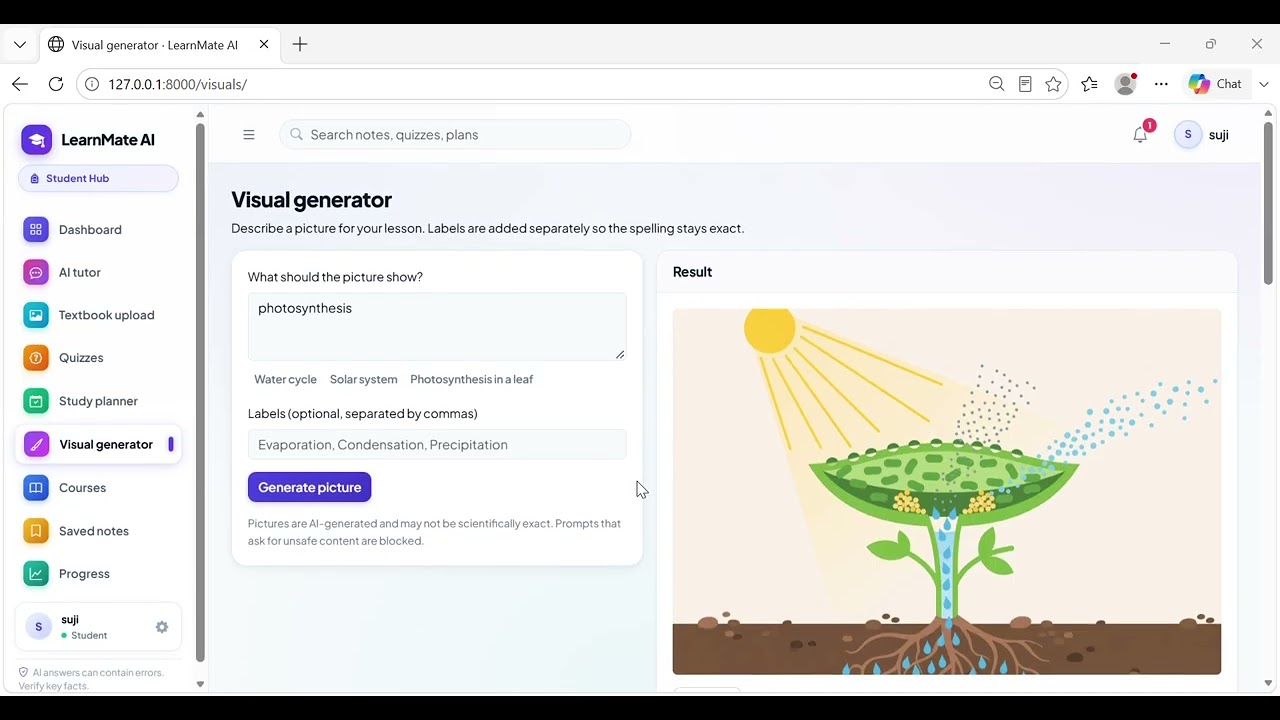
LearnMate AI — Smart Learning Platform Project Description PROJECT NAME ------------ LearnMate AI OVERVIEW -------- LearnMate AI is a full-stack web-based education platform built with Django 5 and Bootstrap 5. It provides an AI-powered learning environment for students, teachers, and administrators, combining traditional course management with cutting-edge AI features such as an AI tutor chatbot, textbook image reader, voice-based questions, quiz generator, study planner, and picture generator. TECHNOLOGY STACK ---------------- Backend: - Python / Django 5.x - Django REST Framework (DRF) — for AI-feature APIs - SQLite (development) / PostgreSQL (production) - Gunicorn (WSGI server for production) - Nginx (reverse proxy for production) Frontend: - Bootstrap 5 (responsive UI) - Bootstrap Icons - Chart.js (analytics / graphs) - Inter font (Google Fonts) - Vanilla JavaScript (app.js) + Custom CSS (app.css) AI / ML Services: - Muse Spark — Text-based AI tutor (chat completions) - Muse Wonder — Multimodal / image reading model - Muse Image — AI image / picture generation - Muse Voice Transcribe — Voice-to-text transcription - SAM 3.1 — Diagram region segmentation (optional) - Local OpenAI-compatible server support (vLLM, llama.cpp, Ollama) Other Libraries: - Pillow — Image processing and validation - pypdf / pypdfium2 — PDF reading for learning materials - requests — HTTP calls to AI APIs - psycopg — PostgreSQL adapter - tzdata — Timezone support (Asia/Kolkata default) PROJECT STRUCTURE ----------------- Education/ ├── manage.py Django management entry point ├── requirements.txt Python dependencies ├── .env / .env.example Environment configuration ├── run_dev.sh / run_dev.bat One-command local dev startup ├── db.sqlite3 SQLite database (development) ├── deploy/ Production config (Gunicorn, Nginx, systemd) ├── myproject/ Django project settings (settings.py, urls.py) └── myapp/ Single Django app (all features grouped inside) ├── models.py 25 database models ├── services/ AI adapters, business logic, safety, rate limiting ├── views/ Feature views and DRF API endpoints ├── templates/myapp/ HTML templates (one per page) ├── static/myapp/ CSS design system + JavaScript ├── management/ Custom management commands └── tests/ 69 automated tests KEY FEATURES ------------ 1. Role-Based Dashboards - Three roles: Admin, Teacher, Student - Each role has a dedicated dashboard with relevant actions and analytics 2. Course & Class Management - Admins create subjects and assign teachers - Teachers manage courses, topics, materials, assignments, and enrollment - Students browse and enroll in available courses 3. AI Tutor Chat - Conversational chatbot powered by a text model (Muse Spark or local) - Saves conversations and allows students to bookmark notes - Rate-limited per user per hour 4. Textbook Image Explanation - Students upload textbook page images - Muse Wonder reads and explains the content - Optional SAM 3.1 integration for diagram region detection 5. Voice Questions - Students record audio questions - Muse Voice Transcribe converts speech to text for the AI tutor - Falls back to text input if the model is unconfigured 6. AI Quiz Generator - Teachers or students generate quizzes from course topics using AI - Server-side scoring — correct answers are never sent to the browser - Supports multiple-choice and short-answer questions 7. Study Planner - Rule-based study schedule creation (works without AI credentials) - AI can enhance or personalize plans when a text model is connected - Teachers can monitor plan progress; students edit and reschedule tasks 8. Picture / Visual Generator - Students request AI-generated educational illustrations (Muse Image) - Generated visuals are saved and linked to course topics 9. Analytics & Notifications - Quiz attempt history, score trends (Chart.js), and activity logs - In-app notification system for assignments, quiz results, etc. 10. Admin Panel - User management, role assignment, AI configuration status - System configuration page shows which AI services are active USER ROLES ---------- Admin — Full system access, user/role management, configuration Teacher — Manage own courses, topics, materials, assignments, quizzes Student — Enroll in courses, use AI tutor, take quizzes, study planning DEMO ACCOUNTS (password for all: LearnMate#2026) ------------------------------------------------- admin — Administrator teacher — Teacher (owns "Grade 9 Science") asha — Student (enrolled, with quiz results and a study plan) karthik — Student (enrolled, with quiz results and a study plan) DATA MODELS (25 total) ---------------------- Profile, Subject, Course, Enrollment, Topic, LearningMaterial, Assignment, Conversation, Message, SavedNote, UploadedImage, ExtractedContent, Quiz, Question, QuizAttempt, QuizAnswer, StudyPlan, StudyTask, LearningActivity, GeneratedVisual, Notification, AIRequestLog, ... SECURITY HIGHLIGHTS ------------------- - Role-based access control on every view and API endpoint - Students access only their own records; teachers access only their own classes - CSRF protection on all forms and API calls - Uploaded files served through private media endpoint with ownership checks - Real image decoding for uploads (not just file extension check) - Audio never written to disk or database - Prompt-injection defence using <untrusted_material> fencing - AI features are opt-in; under-18 users require guardian consent - Rate limiting per user per hour for all expensive AI operations - AI logs store metadata only — prompts, answers, and keys are never logged - Automated data retention / purge management command TESTING ------- - 69 automated tests covering: Registration, login, role permissions, data isolation, CSRF, upload validation, AI adapter success/timeout/retry/429/bad-response, tutor flows, quiz scoring, cheating prevention, study planner, analytics, rate limiting, and management commands Run tests: python manage.py test myapp ENVIRONMENT CONFIGURATION (.env) --------------------------------- DJANGO_DEBUG Debug mode toggle DJANGO_SECRET_KEY Django secret key DJANGO_ALLOWED_HOSTS Allowed hostnames TIME_ZONE Server timezone (default: Asia/Kolkata) TEACHER_SELF_SIGNUP Allow teacher self-registration POSTGRES_* PostgreSQL connection settings META_API_BASE_URL Base URL for Meta AI API META_API_KEY Meta AI API key MUSE_SPARK_MODEL/PATH Text tutor model config MUSE_WONDER_MODEL/PATH Multimodal/image reading model config MUSE_IMAGE_MODEL/PATH Image generation model config MUSE_VOICE_MODEL/PATH Voice transcription model config SAM_MODEL/PATH Diagram segmentation model config RATE_TUTOR_MAX Tutor requests per user/hour RATE_QUIZ_MAX Quiz generation requests per user/hour RATE_VISION_MAX Vision requests per user/hour RATE_VOICE_MAX Voice requests per user/hour RATE_IMAGE_MAX Image generation requests per user/hour MAX_IMAGE_UPLOAD_MB Max image upload size (MB) MAX_AUDIO_UPLOAD_MB Max audio upload size (MB) MAX_MATERIAL_UPLOAD_MB Max material upload size (MB) RETAIN_AI_LOG_DAYS Days to retain AI request logs RETAIN_NOTIFICATION_DAYS Days to retain read notifications PRODUCTION DEPLOYMENT --------------------- Platform: Ubuntu Linux Web server: Nginx (reverse proxy) + Gunicorn (WSGI) Database: PostgreSQL Process: systemd service (deploy/learnmate.service) SSL: Let's Encrypt via certbot Scheduled jobs (cron): 07:00 daily — python manage.py send_reminders 03:30 daily — python manage.py purge_old_data DESIGN PRINCIPLES ----------------- - One clear action per page area - Flat panels with hairline dividers (no card-inside-card nesting) - Single key-figure strip instead of multiple identical stat cards - Sentence-case labels; visible form labels; helpful empty states - Primary color: Indigo (#4338CA) - Accent / success color: Teal (#0D9488) - Font: Inter (Google Fonts) KNOWN LIMITATIONS ----------------- - Meta AI model schemas require alignment with official Meta documentation - Textbook OCR relies entirely on the image-reading model quality - Short-answer grading uses exact-match (after lowercasing); spelling variants are marked incorrect - Tamil-language support depends on the connected model's Tamil capability - SAM 3.1 diagram segmentation is optional and may not be available on all Meta Llama API tiers