Haileydayz
Built at Meta Global AI Developer Hackathon · Oct 26, 2026 · Remote
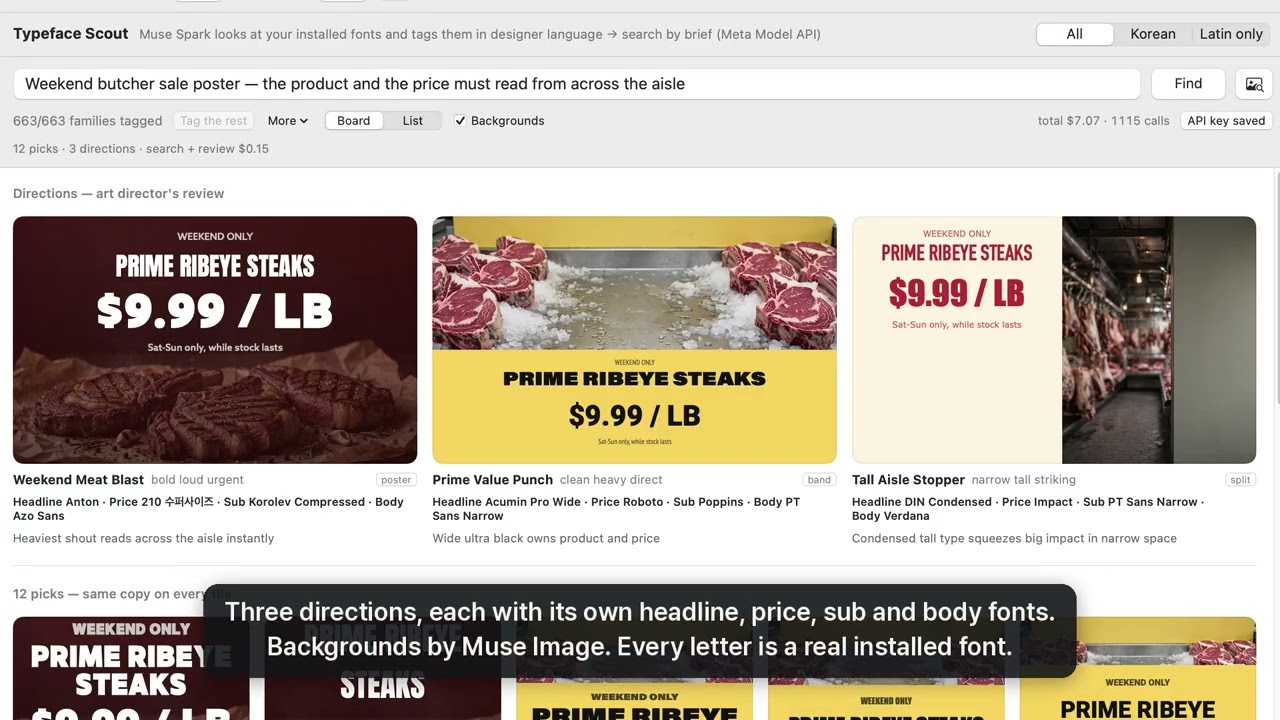
Typeface Scout — find a font by describing the job, or by showing a photo. I'm a graphic designer in Toronto with about 1,900 fonts installed. Designers think in briefs ("warm hand-lettered Korean + English for a bakery sign"), not font names, and most Korean fonts carry no useful metadata, so choosing still means scrolling. Typeface Scout is a new AI tab in Font Preview, my open-source macOS font manager. It renders a sample of every installed font and has Muse Spark tag it the way a typographer would: mood, structure, era, weight feel, best uses, and where it would look wrong. Then you type a brief, or drop a photo of a sign, and get a board instead of a list. Muse Spark reads the genre of the brief and writes sample copy shaped like that genre (a sale poster leads with the product and the price), ranks up to 12 fonts with a one-line reason, then looks at its own picks again as an art director, rendered in that copy, legibility first. It proposes two or three complete directions with separate headline, price, sub and body fonts, each in a different layout over a Muse Image background. Every letter is drawn locally with the real font; images are backgrounds only. 👍/👎 on any tile teaches it your taste. It also knows about 1,200 free Korean fonts from Noonnu that you haven't installed yet, with download links. About US$0.20 per brief, including three backgrounds. Tags are cached on your Mac; font files never leave it.