Prabodh_dev
Built at Meta Global AI Developer Hackathon · Oct 26, 2026 · Remote
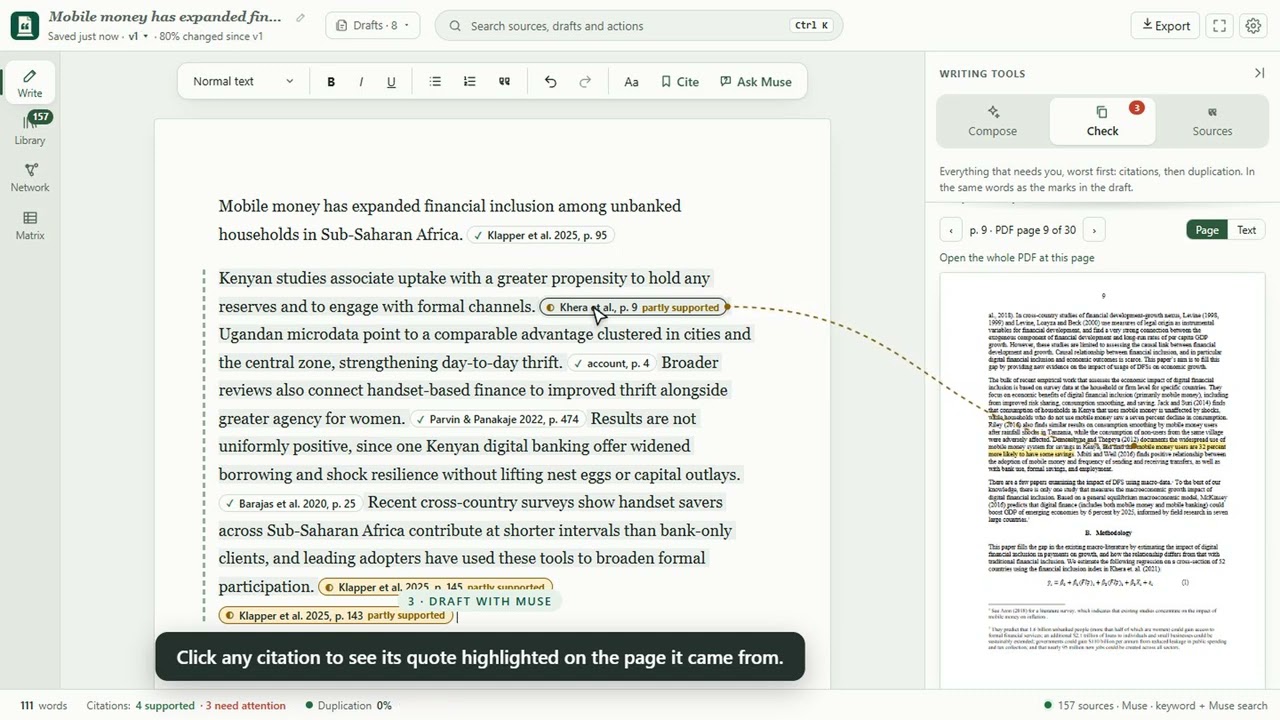
Groundwork: write only what your sources say. Large firms give their people knowledge-management platforms. An individual researcher usually has a folder of PDFs, and often no Scopus or Web of Science subscription, so every paper means a hunt across repositories for a free copy before the real work can start. Meanwhile, AI writing tools produce sentences and references that look right and leave the researcher to check whether the paper actually says it. Groundwork is a personal knowledge platform for one researcher: a Windows desktop app (Electron + React, with a local Python backend) that does three things. 1. A virtual library. Add PDFs, Word files, slides, web pages and scans. Your files stay where they are; Groundwork never copies or moves them. Muse reads each one for its real title, authors, year and summary, so papers show up properly named whatever the file is called, and files them into subject folders by meaning. Folders are virtual, so one paper can sit in several. 2. Free papers without the hunt. Groundwork reads every paper's reference list, maps who cites whom, and lists the works your papers cite most that you don't have. Where a legal open-access copy exists (OpenAlex, Semantic Scholar, CORE: open-access journals, arXiv, university repositories), it downloads in one click, saved as "Author Year - Title.pdf". No subscription needed. 3. Writing you can trust. Write a claim and press Cite: Groundwork searches your library, finds a passage that backs it, and Muse says why. Or ask Muse to draft: every sentence must carry a verbatim quote from one of your papers. Each quote is then located on its page and judged against the claim: Supported, Partly supported or Not supported. Click any citation to see its quote highlighted on the PDF page. Check lists every citation worst first and flags text copied from a source without a citation. References build themselves in APA, MLA, IEEE or BibTeX, and the draft exports to Word with a comment on any citation that did not pass. For literature reviews, review matrices put one paper per row and one question per column (sample, setting, method, findings, limitations); every cell rests on a quote with its page, and Muse names the gaps across the studies and can turn them into a research proposal. Your files stay on your computer. Only the passages Muse needs, and images that need OCR, are sent to Meta's Model API.